These objects are managed centrally by ACME and are flowing in only one direction from ACME to the dealer (or public kiosk). ACME can provide creative material and multimedia objects manufactured by advertising agencies. The objects are distributed by triggering the replication server to fetch new objects. All the types of MMOs that follow can be supported. However, it is expected that there will be a focus on some types because the underlying technologies are sometimes substitutive.
4.8.1. Java Simulator
Java Applets can be implemented as simulators to explain difficult or abstract contexts. Those small applications could be used for performance, economy and finance simulation. The main advantages of the Java technology are easy distribution and platform independence. Java scales well and can be used even for big applications.
Java in 1997
When this document was created in 1997, Java was still a relatively new technology, having been officially released by Sun Microsystems in 1995. The key selling points of "write once, run anywhere" and easy distribution over the web made it revolutionary for creating interactive elements on websites.
The original page featured a Java applet slideshow demonstrating vehicle configurations. Java applets have since been deprecated and are no longer supported by modern browsers.
4.8.2. Macromedia ShockWave/Flash
Macromedia ShockWave objects can be an alternative to Java Simulation objects. ShockWave as a multimedia solution executes faster and can also be distributed over TCP/IP networks. However it is a proprietary technology targeted only at multimedia application development.
Flash/ShockWave in 1997
In 1997, Macromedia Flash (later acquired by Adobe) was emerging as a powerful tool for creating interactive animations and experiences. Flash and ShockWave were considered cutting-edge technologies that enabled rich multimedia experiences in web browsers.
Flash was widely used for automotive sites in the late 1990s and 2000s, providing immersive vehicle configurators, animations, and interactive demonstrations that weren't possible with HTML alone. Flash support was discontinued in all modern browsers by January 2021.
4.8.3. ActiveX Controls
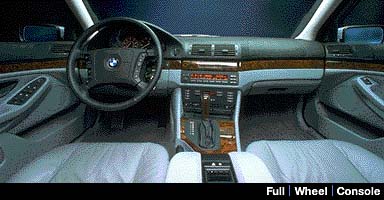
ActiveX controls are essential for some sophisticated display and interaction functions but can be also used as an alternative to Java or ShockWave. From a technical point of view ActiveX controls are distributed OLE controls and can be executed as fast as normal applications. However, the development efforts are also higher than those for Java or ShockWave. ActiveX can be distributed over TCP/IP networks but are restricted to Intel platforms. Another main disadvantage of ActiveX solutions are the system intrinsic security risks. Visit the CarPoint Web-Site from Microsoft for surround video examples using ActiveX technology.
ActiveX in 1997
ActiveX was Microsoft's response to Java and browser plugins, allowing Windows software components to be embedded in web pages. While powerful, ActiveX controls were limited to Internet Explorer on Windows platforms, and posed significant security concerns because they had deep access to the operating system.
Microsoft CarPoint (mentioned in the original document) was one of the first automotive websites to use ActiveX for advanced vehicle visualization features. ActiveX has since been deprecated due to security concerns and the move toward cross-platform web standards.
4.8.4. Pictures
Pictures of the GIF or JPEG types are displayed by the Browser. The type of the object is recognized at run-time. If the referenced object is not available, a text string can be displayed. Other types of pictures can also be supported.
4.8.5. Videos, Animations and Surround Pictures
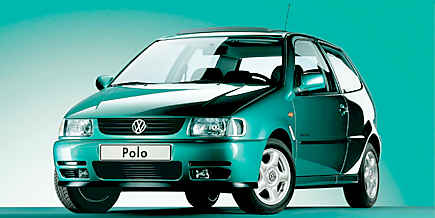
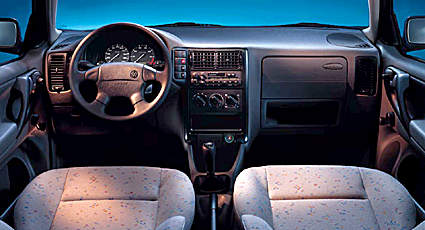
Animated GIFs, MPEG, Quicktime, QuicktimeVR, MS Surround Video or MS AVIs are displayed by the Browser.
Video Technology in 1997
In 1997, video on the web was still in its early stages. QuickTime VR was a groundbreaking technology that allowed users to view panoramic images with interactive navigation, creating an early form of virtual reality experience. It was particularly useful for showing car interiors.
The original page featured QuickTime VR demonstrations of BMW vehicle interiors and exteriors, which would open in new windows. These required special plugins that are no longer supported in modern browsers.




4.8.6. 3D Objects
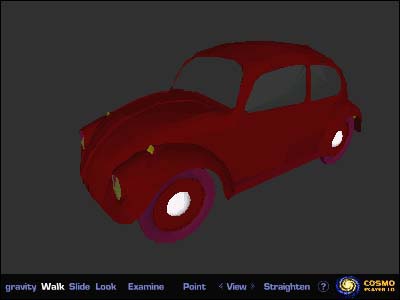
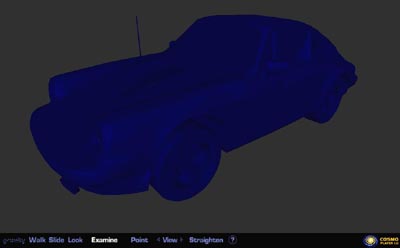
Three dimensional objects can be embedded within the client layout as VRML-objects, which can be zoomed, rotated and interfaced to with a mouse. The display task is solved by the browser. The data can be converted directly from CAD-data.
VRML in 1997
Virtual Reality Modeling Language (VRML) was the first standard for representing 3D interactive vector graphics on the web. In 1997, it was considered revolutionary for allowing users to interact with 3D models of vehicles directly in the browser.
The original page featured VRML models of a Volkswagen and a Porsche that could be rotated and examined in 3D. VRML required special browser plugins and has since been superseded by technologies like WebGL and Three.js.
4.8.7. Sound and Music
WAV and AIFF files for sound or speech can be used. The playback is done by the browser.
MIDI files for background music can be used. The playback is done by the browser. However, without a wavetable soundcard MIDI files do not sound well.
Audio on the Web in 1997
In 1997, audio on the web primarily consisted of WAV files (for sound effects and voice), and MIDI files (for music). MIDI files were particularly popular because of their small file size—critical in the era of dial-up connections.
The reference to "wavetable soundcards" reflects the hardware limitations of the time. Without specialized sound hardware, MIDI playback would use basic FM synthesis, resulting in lower quality audio.
This section is in development as part of the digital archaeology restoration project.
Future updates may include modern equivalents or emulators for some of the original interactive elements.